Restaurants
Manage multiple dining rooms, tables, covers, courses and the final bill from one clear workflow.
QuickConto connects tables, waiters, kitchen, takeaway, online ordering, inventory and checkout in one restaurant management system designed for everyday service.
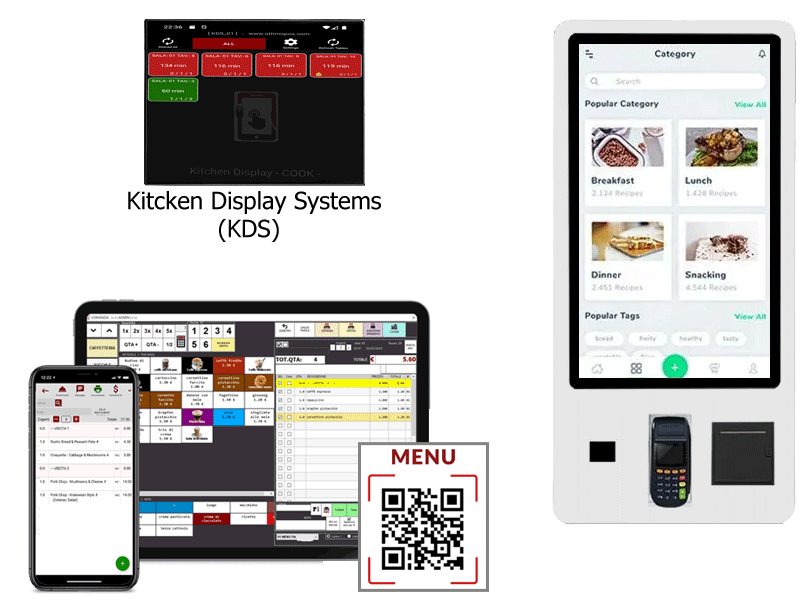
From table to payment, without unnecessary steps
One operating environment for table service, counter sales, takeaway, delivery and direct sales — with the same data flowing from order to kitchen and checkout.
Manage multiple dining rooms, tables, covers, courses and the final bill from one clear workflow.
Take fast orders, handle variations and notes, and coordinate table service, counter and takeaway.
Speed up counter and table orders, tabs, discounts, payments and fiscal documents during busy service.
Keep pickup orders organised, prepare them in sequence and manage counter orders without mixing them with table service.
Let customers order from their own phone using a link or QR code, for table, pickup or delivery.
Support direct sales, barcodes, discounts, loyalty tools, stock control and sales analysis in the same system.
QuickConto brings together front of house, kitchen, checkout and back-office tools, so information is entered once and follows the order through the whole service.
Manage multiple rooms, tables, reservations and covers. Orders can be organised by guest and the bill can be split by customer or group.
Use dedicated counter order memories for bars, pubs, food shops and pickup orders, with predefined discounts and surcharges.
Connect supported fiscal printers and manage the final document from the same operational flow used for tables and orders.
Keep quantities and availability under control and import products and prices from CSV/XLS files where supported.
Review sales trends, best-selling items and operational data to understand what is working in the venue.
Exchange service messages between dining room and kitchen so important information does not get lost during busy periods.
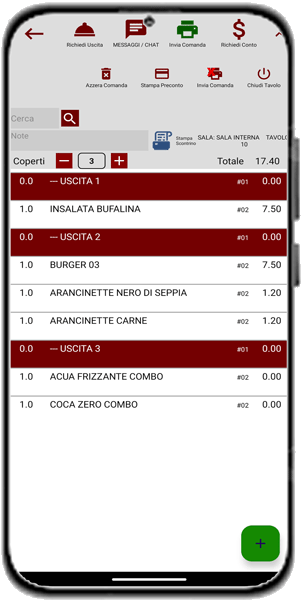
Use the QuickConto Android app on smartphones or tablets to take orders directly at the table. An internet connection is not required: the devices can work over the venue’s local Wi-Fi network.
In Chef/Cook mode, the app becomes a kitchen display: incoming orders are shown digitally and the kitchen can mark preparations as ready for the waiter.
A KDS workflow can reduce kitchen printouts, paper rolls and confusion while keeping service status visible to the team.
QuickConto can publish up to six different order pages on the web or on the local network, giving customers a direct way to order without adding a separate ordering platform.
Create links, buttons or QR codes that open the order form on the customer’s own phone. Each page can be configured for table ordering, takeaway, delivery or a self-service kiosk.
Where configured, online orders can also use payments through your own PayPal account.
 Scan to try the demoOpen the QuickConto online order page
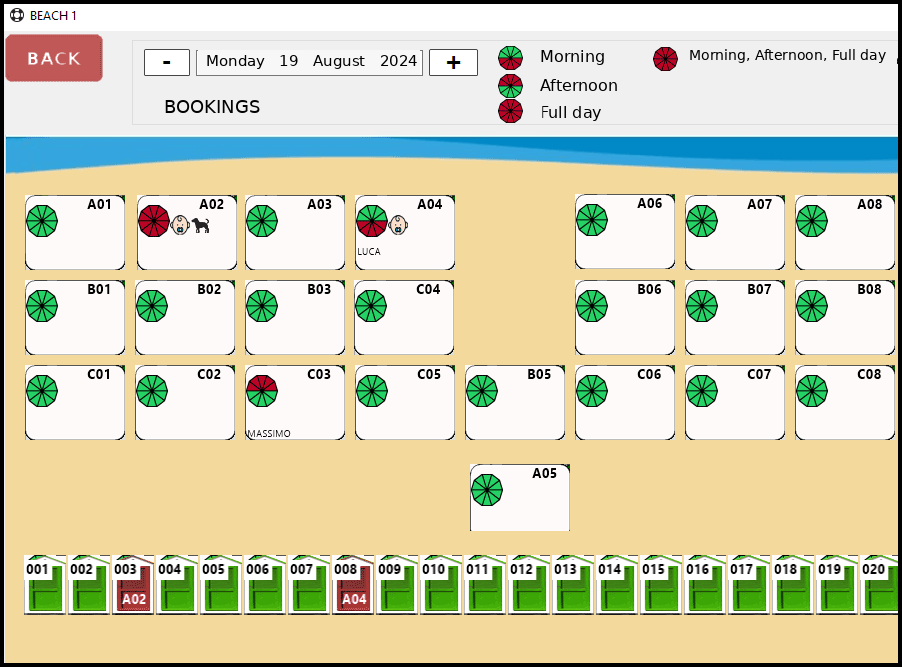
Manage umbrellas, sunbeds, deckchairs and day areas with a visual map and time-slot availability.
Track bookings for morning, afternoon or full day, register guests and keep the beach or pool layout under control from one screen.
QuickConto helps seasonal facilities organise positions, services and guest attendance with the same practical approach used for restaurant operations.
QuickConto is designed to fit into an existing setup: the main software runs on Windows and Android devices can connect over the venue’s local Wi-Fi.
Main management station for dining room, checkout, administration and stock.
Smartphones and tablets for tableside orders and mobile restaurant operations.
Use Android devices in Chef/Cook mode to view orders and update preparation status.
Integration with supported fiscal-printer models, depending on the configured market and hardware.
COMMUNITY, FULL and ENTERPRISE provide different annual order limits and feature levels. Open the pricing page for the complete comparison.
orders / year
Open full pricing →orders / year
Open full pricing →orders / year
Open full pricing →