Database setup
DATABASE SETUP
Start QUICKCONTO from Windows© START menu or via "QUICKCONTO" icon.
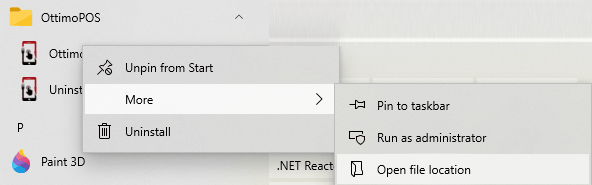
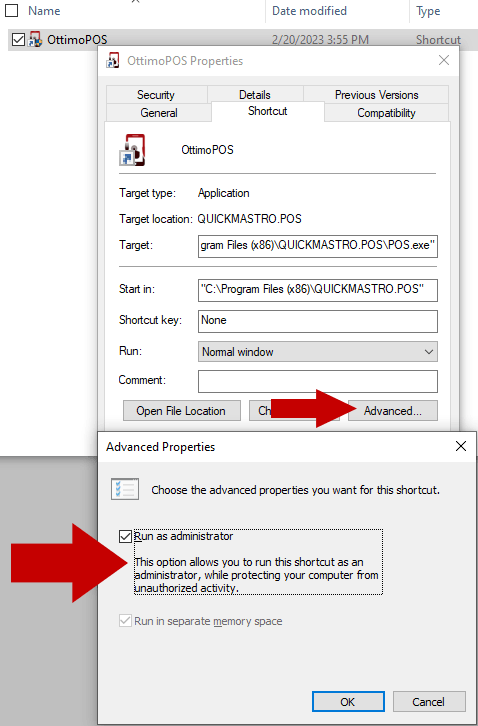
To run QUICKCONTO as administrator click on the start icon with the right mouse button and then select "run as administrator".
Create a new activity/archive by clicking on "Add POS".

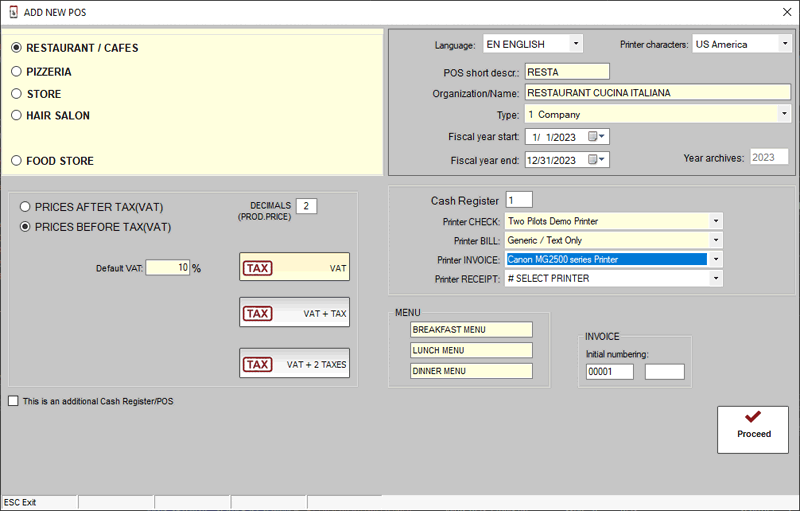
Select the type of activity that is similar to that carried out in the store e.g. "RESTAURANT / PUB..."
(software features vary based on the type of activity being selected).
Type an abbreviation or station name without using spaces or special characters e.g. "RISTO" and then enter the name of the business ex. "RESTAURANT CUCINA ITALIANA".
Continue and confirm the financial year e.g. 2023 and the legal nature of the owner of the business e.g. business.
Immediately afterwards it will be possible to define the default VAT rate e.g. 10%, if the prices must be indicated inclusive of VAT or not, how many decimals to use and whether to apply an additional tax in addition to the VAT (or even two, depending on local taxation)
Complete the first configuration by indicating the printers to be used (select from the drop-down menu), the menus used in the restaurant e.g. breakfast/lunch/dinner and the initial numbering of the invoices (number + serial, if any, e.g. 00001/QC23 --> the serial is useful if it is necessary to uniquely identify the invoices issued by the workstation).
Click on "Proceed" to create the work environment.