
Rooms & tables
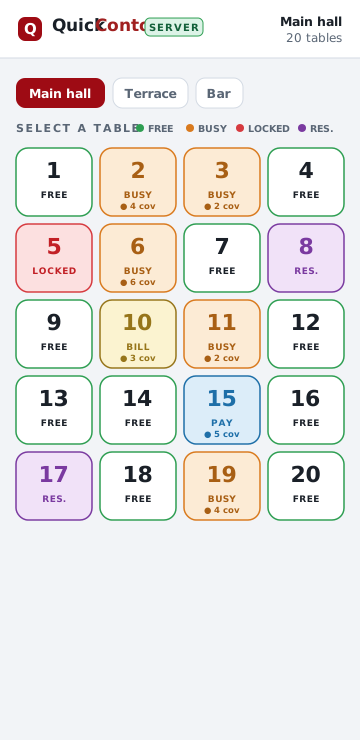
Your whole floor at a glance. Free, busy, reserved, bill, paying — colour‑coded and live on every device.
QC ▸ FLOOR OS ▸ TABLET + PHONE
QuickConto Mobile turns any tablet or smartphone into a complete restaurant ordering system — waiter terminals and a live kitchen display, working together over your own Wi-Fi. No computer. No cables. No monthly lock‑in.
Android · Google Play

Apple · App Store

…or tap DEMO / TRIAL in the app to explore a full sample restaurant, offline.
WORKS OFFLINE · 27 LANGUAGES · WAITER + KITCHEN (KDS) · UP TO 9 ROOMS
— WHAT IT DOES —
Built with real waiters and kitchens. Fast to tap, hard to break, and it keeps working when the Wi‑Fi doesn’t.
Your whole floor at a glance. Free, busy, reserved, bill, paying — colour‑coded and live on every device.
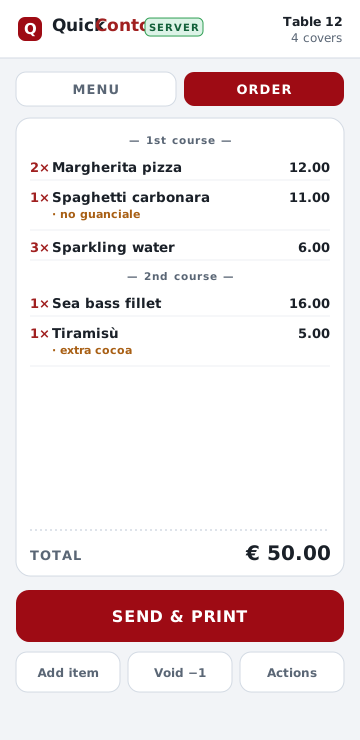
Fire dishes by round — starters, mains, dessert. Split, move and time each course from the table.
“No guanciale”, “extra cocoa”, “split in two”. Add modifiers and free notes in a single tap.
Send to the kitchen and print the ticket in one action. Reprint or void cleanly when plans change.
Network drops? Orders queue on the device and send themselves the moment it’s back. No lost tickets.
Add all the waiter tablets, phones and kitchen screens you want. One device is the hub; the rest connect.
Revenue, covers, average ticket and best sellers — broken down by day, room, operator or item.
Link a guest to a table and tag the sale, for reporting that actually tells you something.
Light or dark, 27 languages, and right‑to‑left layout for Arabic and Hebrew — per device.
— TWO SIDES, ONE SYSTEM —
The same order, seen the way each person needs to see it — a mobile terminal for the waiter, a Kitchen Display System (KDS) at the pass. Choose the mode per login: a device is a waiter terminal or a kitchen display in one tap.
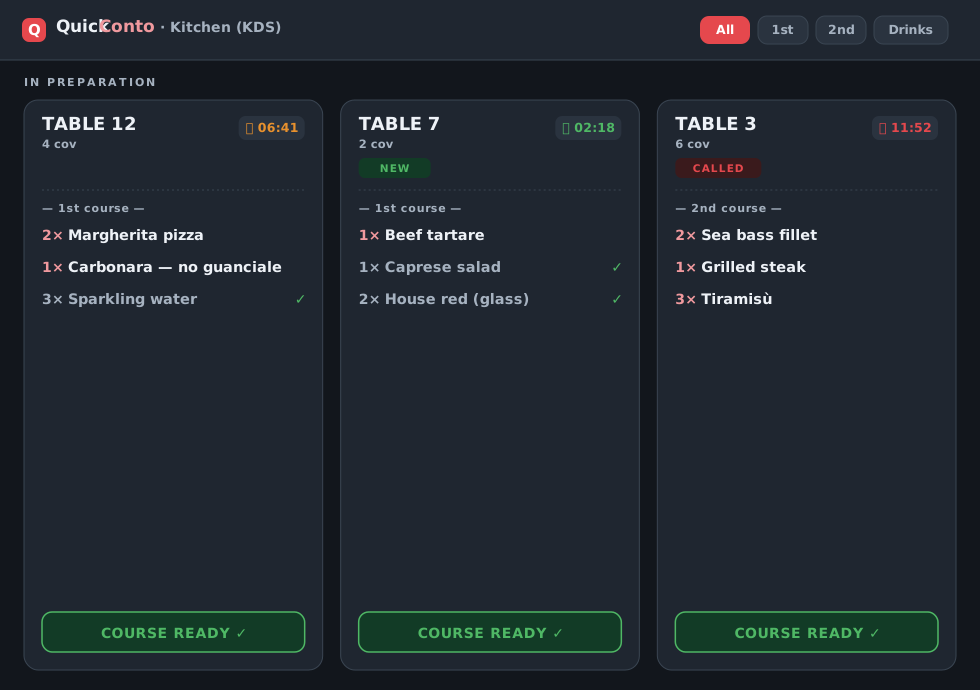
A paperless kitchen display that replaces printed dockets: every order lands on screen the instant the waiter sends it.
— UP AND RUNNING TONIGHT —
One device becomes the hub. Every other tablet or phone connects to it over your Wi‑Fi. Here’s the whole thing.
Open the QuickConto server on it. This device holds the menu, the rooms and the day’s orders.
The hub shows something like 192.168.1.10 : 80. That address is what the other devices connect to.
Rooms, departments, items, printers, tax and operators — all from a clean dashboard. Then you’re open.
27 languages, scrollable — pick yours. The app remembers it next time.
Type the server address and your operator password. Tap Connect.
Or tap DEMO / TRIAL first to explore a full sample restaurant with no server at all.
In the Manager, give a login the Kitchen role. That device now opens straight into the kitchen display.
Same hub address, same one‑tap connect. Mount the tablet at the pass.
Orders appear as cards grouped by course, with timers. Tap ready, and the room knows.
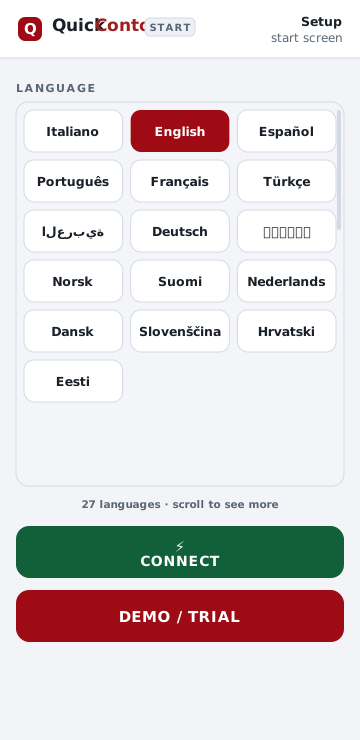
Tried it in seconds: the DEMO / TRIAL mode runs the full app offline, so staff can learn it before a single guest sits down.
— HOW THE NETWORK WORKS —
QuickConto doesn’t rely on the cloud. One device is the hub and the others reach it over Wi‑Fi. Pick the setup that matches your place.
Connect every tablet and phone to the same Wi‑Fi from your router. The hub shows a local address like 192.168.1.10:80 — enter it once on each device and you’re linked.
Tip: reserve a fixed local IP for the hub (a “DHCP reservation” in your router) so its address never changes.
The hub can be a smartphone. Turn on its personal hotspot and let the other devices join it — that phone is both the network and the server. Perfect for food trucks, markets and pop‑ups.
Good to know: no SIM data is used for orders — devices talk to each other locally, not over the internet.
Normal service is fully local and needs no internet. To reach the hub from elsewhere, forward its port on the router and use your public IP (or a dynamic‑DNS name).
Security: if you expose the hub online, protect it with strong operator passwords and only open the port you need.
NO INTERNET NEEDED FOR SERVICE · THE APP KEEPS WORKING EVEN IF THE LINE GOES DOWN · ORDERS QUEUE & SYNC WHEN A DEVICE REJOINS
— MAKE IT YOURS —
The Manager is where your restaurant is shaped — menu, floor, printers, people. Set it once; every device follows.
Up to 9 rooms, 500 tables each — arranged the way your floor really is.
Departments (kitchen, pizza, bar…), full item catalog, images and colours.
Composite items that fire several products at once — set menus and deals.
Variations and links: choose exactly which add‑ons each item allows.
Route departments to printers; design receipt and pre‑bill formats.
VAT rates and the currency symbol your prices show in.
Passwords, roles (waiter / kitchen) and levels that gate who closes tables.
Authorise each tablet or phone that’s allowed to connect to the hub.
Load, sold and on‑hand — computed as orders go through.
Bring in items and variations from CSV, JSON or TXT in one go.
A customer list to link to tables, plus an optional statistics card.
Document formats and email delivery for the paperwork you keep.
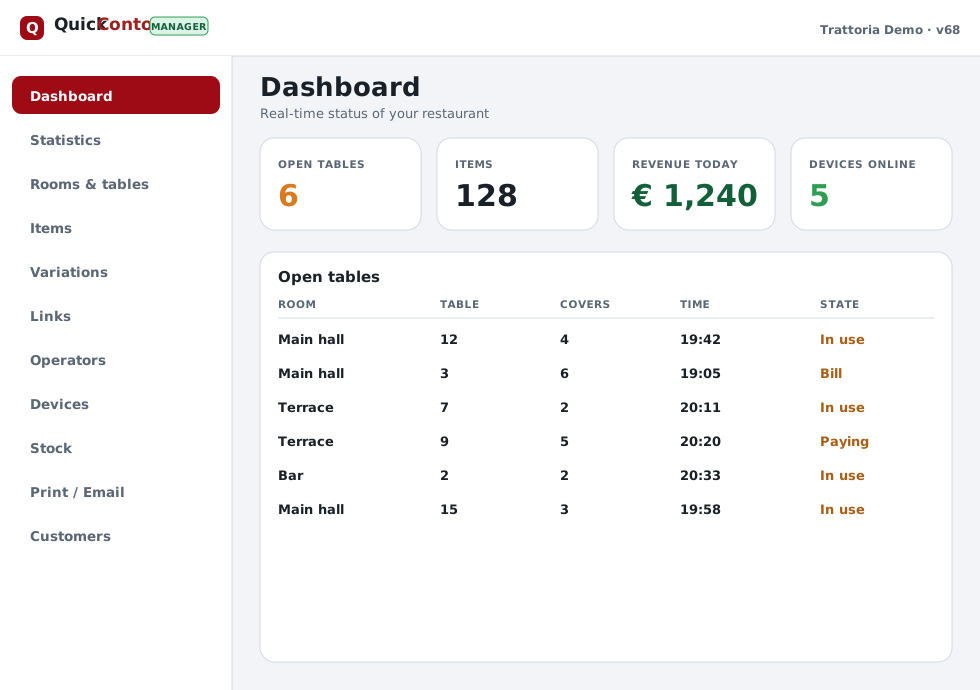
The Manager dashboard — real‑time status, statistics and every setting, on the same tablet.
— PRICING —
Your whole first year is on us — every feature, every device. From the second year, one small yearly licence keeps the whole restaurant running.
YEAR ONE
Everything included. No card required.
ONE LICENCE · WHOLE RESTAURANT
The exact price depends on your country — tell us where you are and we’ll confirm it.
Cancel any time — when a licence isn’t renewed, the app simply stops for that season. Nothing is charged automatically without you.
— SEE IT WORKING —
— 27 LANGUAGES —
Pick a language per device. Arabic and Hebrew flip the whole layout to right‑to‑left, automatically.
— OPEN TONIGHT —
No PC. Nothing to install on a computer. Just the tablets and phones you already have — and your Wi‑Fi.
Android · Google Play
Apple · App Store
Prefer to look first? Install the app and tap DEMO / TRIAL — the whole system runs offline with a sample restaurant.
— GOOD QUESTIONS —
Correct. One tablet or phone acts as the hub, and every other device connects to it over your local Wi‑Fi. No PC, no server rack, no cabling.
Yes. Everything runs on your own network. If a device briefly drops off, its orders queue and send automatically the moment it reconnects — nothing is lost.
As many as you need — waiter tablets, phones at the till and kitchen screens. Add or remove them any time from the Manager.
27, including right‑to‑left Arabic and Hebrew. Each device can run in a different language.
Yes. The built‑in DEMO / TRIAL mode loads a complete sample restaurant and runs fully offline, so the team can learn it with zero setup.
Both. Download from the App Store or Google Play and run it on the tablets and phones you already own.
— TALK TO US —
Tell us about your restaurant and we’ll help you get set up — or send your country’s exact price. We usually reply within one business day.
QuickMastro SRL
Maker of QuickConto
Via Elio Lampridio Cerva — Rome, Italy
VAT / P.IVA · C.F.: 11351231003
https://quickconto.com/mobile
Support: quickconto@quickconto.com